Not every question deserves a PhD: How we built a prompt router that knows when to think less

"Why would anyone want a dumber response?"
That was the pushback I got when I argued that sometimes the right answer is to think less.
I work on AI products that marketing teams use at scale every day, which means I feel latency and token cost problems before most teams even notice them. We had spent months building an enrichment pipeline we were genuinely proud of, and for good reason. When Opal pulled in brand guidelines via RAG, searched the knowledge base, loaded specialized tools, and consulted episodic memory from prior conversations, the responses were measurably better.
So, why would anyone skip that?
The thing is, we were already making smart decisions about enrichment. We weren't blindly fanning out across every context source on every request. The system checked whether relevant knowledge bases were available, whether the conversation state warranted certain lookups, and what model the user had selected. The enrichment pipeline had conditionals. It had early exits. It was a principled system.
But even when those checks concluded "no, we don't need this," the system still spent time evaluating the question. Each individual enrichment check was fast; tens of milliseconds fast. But in a system where total latency is the sum of embedding generation, context retrieval, prompt assembly, and model inference, those milliseconds compound.
For a user waiting on a simple factual answer, those extra seconds are the difference between "this feels instant" and "this feels sluggish."
The same inefficiency shows up in cost. Every unnecessary knowledge base search, every tool discovery pass that doesn't need to happen, every prompt routed to a top-tier model when a lighter one would suffice – those expenses multiply across thousands of daily conversations. At enterprise scale, the token economics of using maximum effort become unsustainable.
Across dozens of customer conversations, the pattern was consistent: users were willing to sacrifice enrichment quality for speed and cost efficiency when the task is simple. Not because they want bad answers, but because a fast, economical answer to "summarize this article" is the better answer. And while users love control, they also wanted the system to make these decisions automatically, without having to think about it each time.
The restaurant that runs every order the same way
Imagine a restaurant that runs every order through the same process, whether it's a five-course tasting menu or a side of fries. Same number of cooks, same prep time, same plating choreography. The fries would be great. They'd also take 45 minutes.
That's what we were doing. Every prompt, no matter how simple, went through the full kitchen.
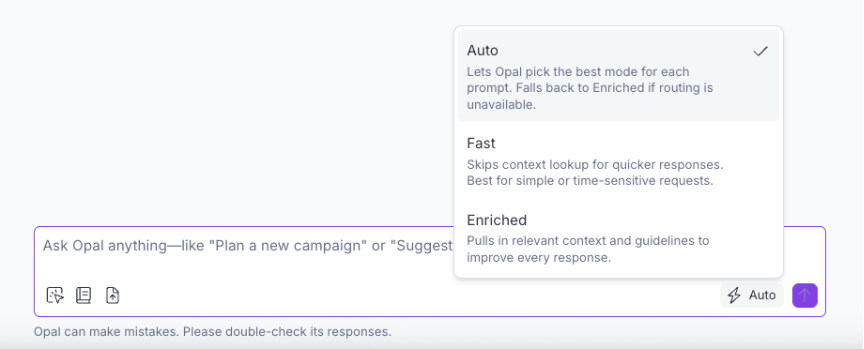
Three modes, one dropdown
We landed on a three-tier routing model:
-
Fast mode skips context enrichment entirely. Cheap application context (like what page you're on in the product) still flows through, because it's trivially fast to fetch and often relevant. But the expensive fan-out, RAG, memory, tool discovery, all skipped. Just the prompt and the model.
-
Enriched mode is the full experience. Brand guidelines, content history, tools, memory. This is what you want for complex content creation, campaign planning, or anything that benefits from Opal knowing your brand's voice and unique context.
-
Auto mode is where it gets interesting. Instead of asking the user to decide, Opal classifies each prompt and picks the right approach automatically. Simple question? Skip the enrichment, use a lighter model, get the answer back fast. Complex creative task? Pull in everything, use the most capable model, take the time to get it right.
With Auto mode, we make the speed-vs-quality tradeoff intelligently, on every single message, without the user ever having to think about it.
Meet Mycroft: A routing brain in 25 milliseconds
For Auto mode, we built a dedicated service with the internal codename Mycroft. Its job is simple: look at a prompt and decide what it needs before anything else happens.
Every prompt under Auto mode gets sent to Mycroft before the enrichment fan-out begins. Mycroft runs the text through a lightweight sentence encoder to generate a numerical representation of the prompt's meaning. That encoding step takes about 10 milliseconds.
Combined with contextual signals and classification, the entire routing decision completes in about 25 milliseconds end-to-end.
Beyond the semantic embedding, Mycroft extracts 20 auxiliary features from each prompt: things like prompt length, line count, whether it contains code fences or SQL keywords, if it calls an agent, whether it ends with a question mark, if it includes phrases like "explain how" or "walk me through," and signals like brand identity tokens or user preference keywords. These lightweight regex-based features capture structure and intent that pure embeddings might miss, and they're extracted in just a few milliseconds.
That combined representation – embedding plus 20 auxiliary features – gets fed into five classification heads. Each one is trained to answer a specific routing question:
- Skip memory? Does this prompt need the user's conversation history, or can we skip the lookup entirely?
- Skip RAG? Does it need a knowledge base search, or is this self-contained?
- Skip tools? Does it need access to specialized tools, or is this a pure language task?
- Which model provider? Should this go to Gemini or Claude?
- Which inference tier? Should it use a light, mid-range, or pro model?
To repeat: the entire classification runs in about 25 milliseconds. By the time the user finishes reading their own prompt, Mycroft has already decided how to handle it.
The part that matters most: The safety net
Mycroft needs at least 80% confidence to skip any enrichment, and at least 70% confidence to override the user's default model provider. Below those thresholds, it falls back to the full enriched mode.
This asymmetry is intentional. A routing mistake that adds unnecessary enrichment costs tokens and time. A routing mistake that skips needed enrichment costs quality. We calibrated the system to be more afraid of the second kind.
What surprised us
The most interesting finding was behavioral, not technical.
All of our Beta users actively praised Auto mode. They didn't think of it as getting worse answers, they thought of it as getting the right-sized answer. When you're asking a quick question, a fast, efficient answer is the better answer. Speed and cost efficiency aren't tradeoffs against quality. For simple prompts, they're dimensions of quality.
This reframed how we think about intelligence in AI products. The instinct in this space is to always maximize capability. More parameters, more context, more reasoning. But matching the level of effort to the task isn't "dumbing things down." It's a smarter system. A system that always uses maximum effort on everything isn't thorough. It just can't tell the difference between tasks.
The cost implications compound too. At enterprise scale, every unnecessary knowledge base search, every tool invocation on a simple prompt, every top-tier model call for a factual lookup adds up. Right-sizing inference isn't just a better user experience – it's a meaningful cost lever.
Two benefits, one architecture
This work delivers two compounding advantages: speed and cost.
Speed is what users feel directly. Skipping unnecessary enrichment and routing to a lighter model means faster time-to-first-token on simple prompts. The difference is immediately noticeable in conversation flow.
Cost is what scales behind the scenes. Every skipped RAG query, every prompt routed to a mid-tier model instead of the top tier, every tool discovery pass that didn't need to happen, those savings multiply across thousands of daily conversations.
The two reinforce each other. The same routing decisions that make responses faster also make them cheaper. We didn't have to choose.
|
Before (every prompt) |
After (Auto mode) |
|
|
Enrichment checks |
All evaluated |
Only what's needed |
|
Model tier |
Fixed per instance |
Matched to prompt complexity |
|
Latency |
Constant (full pipeline) |
Variable (scales with task) |
|
Token cost |
Constant (full enrichment) |
Variable (scales with task) |
What's to look out for next
We’re excited to continue iterating on Auto mode. We built a routing quality dashboard to track progress. We want drift alerts that flag when the model's decisions shift outside expected ranges. And we want to feed user signals (thumbs down, regenerations) back so corrections compound over time.
If you're building AI products and thinking about tokenomics and prompt routing, I'd love to compare notes. This is one of those problems where the right answer depends heavily on your users and your enrichment surface, and I think the industry is still working out the playbook.

Nikita has helped take Opal from 0 to 1 as the AI platform powering marketing teams at major global brands. Her career sits at the intersection of people, processes,...
- Last modified:2026-06-04 09:39:12