How does a Virtual Teammate work? Ft. The anatomy of a VT

Amit ShimshiAmit Shimshi
31. aug. 2026

A Chief of Staff Virtual Teammate and a Personalization Strategist Virtual Teammate have almost nothing in common on paper. One runs your morning brief and preps your meetings. The other hunts down an underperforming segment and builds the test to fix it. Different work, different systems, different outputs.

Open either one up and you find the same four parts, the same three-layer memory, and the same kind of real, credentialed identity. That shared anatomy is what makes a Virtual Teammate a Virtual Teammate (and different to other "AI teammates" you've previously heard about).

And what makes it different is worth understanding before you go ahead and 'hire' one so, let's start with what a Virtual Teammate is made of.

The anatomy of a Virtual Teammate: four parts, assembled into one specific role

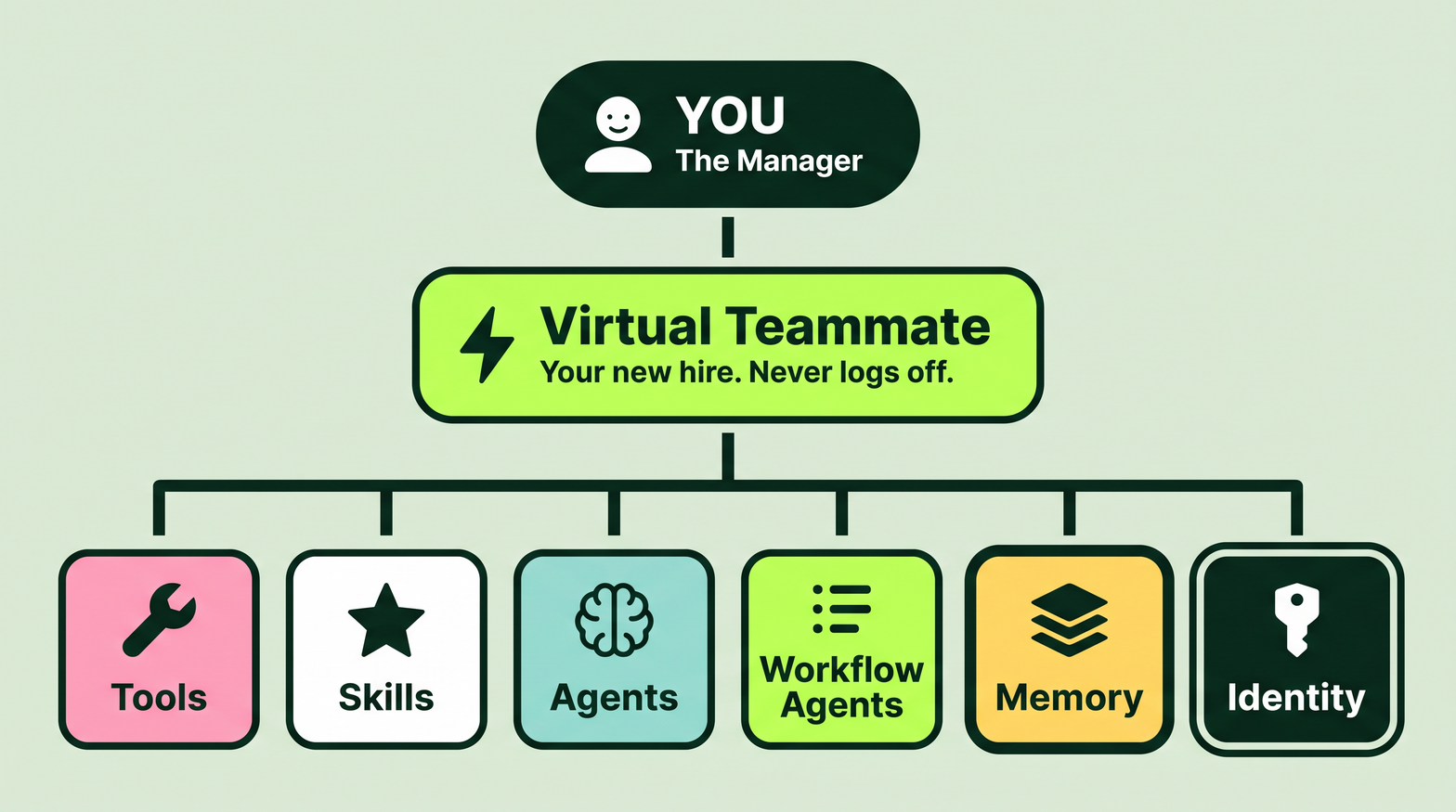
A Virtual Teammate isn't one enormous model trying to be good at everything. It's a stack of smaller, sharper parts, assembled into a role. Four of them do the heavy lifting for each VT:

Tools are how any of it touches reality. Reading a calendar, querying a CRM, publishing a page, launching a test in the experimentation platform you use. Without tools, you have a system that can reason beautifully about work it can't do or access.

Skills are the rules and context that shape the output. Some are organization-wide: things like brand voice, approved templates, compliance requirements. Others are entirely yours — the voice you ghostwrite in for a specific exec, the structure your weekly report always takes, the three things you always want flagged in a summary. Skills capture how work gets done, so you set it once instead of re-explaining it in every prompt.

Agents are purpose-built to complete one specific, well-defined task. Things like summarize a thread, score a segment, pull what changed in a performance report. You give an agent inputs, it runs, it returns a result. Check out our ready-to-go agents in the Agent Directory.

Workflow agents are the agentic orchestrators. They handle the trigger that decides when work starts — a schedule, a webhook, an incoming email — then run a sequence of agents in order, with logic for branching and looping when the situation isn't straightforward. A job like a Daily Brief in the morning isn't one agent, it's a workflow agent coordinating several agents.

Stack those four together, give them three-layer memory and a real identity (more on those two points in just a scroll), and you have a Virtual Teammate.

Modern tech org chart diagram illustration.png

A role is made of jobs

Those four parts don't just sit there. They get assembled into jobs, and jobs get assembled into roles.

A job is one specific thing a Virtual Teammate is responsible for. Not a capability, not a feature, but a piece of work with a beginning and an end. A Chief of Staff's jobs include the Daily Brief and Meeting Prep. A Personalization Strategist's jobs include spotting a segment that's slipping and recommending what to do about it. An SEO and AI Search Analyst's jobs keep your content visible across traditional search and AI answers, which are increasingly not the same problem.

A role is a bundle of jobs. And every job, on every Virtual Teammate, runs the same four beats.

How a job actually runs: the four beats

1

Extract: The job pulls the raw material it needs from wherever that material actually lives — a calendar, an inbox, a queue of tickets, a performance report. As it comes in, signal gets sorted: needs action, FYI, or low signal. Nothing important gets buried under something trivial, and nothing trivial gets escalated into your morning.

2

Enrich: The pieces get cross-referenced into one coherent picture. What changed, what it means, what's worth doing something about. This is the beat that turns five disconnected lists from five different tools into a situation you can read (in one place) in thirty seconds.

3

Compose: The job shapes that picture into an output built for you specifically — deciding what to surface and what to leave out. Skills and memory are what make that tailoring possible. A brief written for a VP of Marketing should not read like a brief written for a solo content marketer, and it doesn't.

4

Act: When the job calls for it, the Virtual Teammate assesses whether it should step in, then does the thing. Schedules the meeting. Sets up the A/B test or personalization campaign (but never without permissions). Updates the page. Composing tells you what's true. Acting changes what's true. That's the line between an assistant and a teammate, and most software has never crossed it.

Take the Chief of Staff's Daily Brief as a concrete example. It extracts your calendar, inbox, and messages. It enriches them into "here's what moved since yesterday and here's what's coming"; it even recognizes that something was completed when it started in Outlook but was completed in Teams. It composes your morning brief. And when the signal is strong enough that it knows you'd want it, it acts — drafting a response and leaving it waiting for your approval.

The Personalization Strategist runs those same four beats over completely different material — and its 'Act' ends in a built A/B test sitting in review, not in another strategy doc for someone else to action.

Want to hear more about what each of Optimizely's VTs can actually do? Go find out with Tales of Virtual Teammates.

Memory, in three layers

Those same four beats run every time a job fires, because it has its own identity. But what changes over time is what they know going into each job.

A Virtual Teammate gets more useful with every run because its memory isn't a single blob; it's three layers, and they hold no matter which VT or which job you're looking at.

  • Each job keeps its own running state: Whatever a job gathers accumulates run over run, so nothing starts from zero. That's what lets the Enrich beat compare what's new against what was already known, instead of rebuilding the whole picture from scratch every morning.

  • A core profile anchors everything: Before a Virtual Teammate does its job for the first time, it has a first-day-on-the-job exchange with you. Not a form — a conversation, pre-filled as far as possible from what its connectors can already see. You confirm the parts that are right and correct the parts that aren't. That becomes a standing profile: your priorities, your key people, what actually matters to you. Every job from then on weighs those specifics above anything generic.

  • A rules layer rewrites itself: Tell it once to always flag a particular account, or to handle a particular kind of request differently, and it holds onto that permanently. No ticket. No release cycle. The next run just behaves differently.

Find out the best practices for collaborating with a Virtual Teammate (including how to nail that first-day-on-the-job vibe).

Identity: the thing that makes it real

Here's the part that separates a Virtual Teammate from every other AI setup on the market.

A Virtual Teammate isn't a shared tool that multiple people log into. It's a named entity with its own identity, its own email address, and its own provisioned access to the systems it needs — set up the same way you'd onboard a new hire. Not an API key. Not a shared admin login. A real, managed identity that belongs to that Virtual Teammate and no one else.

This is not a small detail. It's the thing that makes everything else in this post actually work.

Because it has its own identity:

Its work is trackable and auditable: When the Chief of Staff drafts a response, blocks a meeting, or flags an account, that action is attributed to it — clearly, permanently. You know what it did, when it did it, and why. That's the kind of accountability you expect from a person on your team, not from a tool someone opened.

Its memory belongs to it: The three-layer memory described above is scoped to that Virtual Teammate's identity, not to a user session or a chat window. It compounds over time because it has somewhere to compound to. Every run makes the next run smarter, because the identity is the anchor.

Anyone on the team can work with it: Because it has its own identity, it isn't locked to the person who set it up. You can send it a message in Teams. Your colleague can send it a message in Teams. It responds, takes action, and picks up where it left off — because it knows who it is, and it knows what it's been asked to do.

It never goes off shift: Its credentials are always active. It can execute jobs at 2am on a Saturday if the trigger fires. No one needs to be at their desk. No one needs to log in on its behalf.

Take the identity away, and you have a capable but amnesiac system that resets every time someone opens a new chat. Give it an identity, and it's a teammate — one with a name on the org chart, a memory that grows, and a presence in the tools your team already uses every day.

Connectors: how it gets into your systems

Identity is what a Virtual Teammate is. Connectors are how it gets in.

Connectors are the managed logins into the systems where a Virtual Teammate's jobs actually live — your CMS, project management tool, Teams, calendar, email, CRM, ticket tracker, whatever a given VT role requires. They are provisioned alongside the identity, the same way you'd set up a new hire's system access on day one. Not an API key someone has to generate and babysit. Not a one-off integration that breaks when someone rotates a password. A stable, managed connection that belongs to the Virtual Teammate.

This is what turns presence into action. The identity says who it is. The connectors say where it can go. Together, they mean a Virtual Teammate can read your calendar, write to your CRM, post in Teams, and publish a page (if you approve that) — not because a human granted it temporary access, but because it has standing access of its own.

Why this isn't just an agent with a nicer name

Let's just pause quick, because the anatomy above is exactly what creates the difference.

Most of what gets sold as an 'AI agent' runs two of the four beats. It extracts, it composes, it hands you a result, and it goes back to waiting for a human to do something with it. Genuinely useful, but still something you have to remember to open.

A Virtual Teammate is proactive — Extract and Enrich already ran on a trigger before you opened anything. It's collaborative, because a real identity means anyone on the team can hand it work through Teams, not just the person who set it up, and several Virtual Teammates can work a problem alongside each other and alongside your team. And it learns as it goes, with memory scoped to its jobs rather than a flat transcript of everything you've ever typed.

That's the whole distinction: an agent completes a task when asked. A Virtual Teammate holds a role whether or not you're at your desk (or OOO, like Kevin can now be). 

Here's the full breakdown of Virtual Teammates versus AI agents if you're curious.

How these components work altogether 

Okay, let's say it's Tuesday morning. Pre-coffee for you, but this is already in motion:

A workflow agent wakes up on a schedule. It uses tools to extract what's moved overnight — calendar, inbox, CRM, tickets. It runs the signal through specialized agents, each doing one thing well: one summarizes email threads, one flags changes to your key accounts, one spots anything that needs a decision before 9am. Skills shape the output into the format and tone you've already told it you want. Memory means it knows what matters to you specifically, not what matters to someone with your job title in general. And if it has enough confidence that you'd want it to, it acts: a draft is written, a meeting is blocked, a response is queued.

Yep, that's right. By the time you open your laptop, the work has already started. The brief is waiting, the decisions are surfaced, the things that needed doing have been handed off or flagged.

That's the anatomy working as a system — not a feature you use, but an AI teammate who already showed up.

Want to find out more about what Virtual Teammates can do for you? You got it.