Reliable web content makes a significant impact on user experience (UX). It's important to separate backend content management from frontend presentation in your project.
You can build upon your content foundation with a headless environment, which enables you to deliver the best UX possible on any device or platform.
Here are five tips on how to get your content management infrastructure working for your organization effectively:
1. Develop a digital web strategy
There are so many different tools that have been developed in recent years to help people market their business online. Many of these tools integrate with each other, which means they can connect and work together.
Integration will require some effort on your end, since most tools do not automatically mesh well with one another right out of the box. It's also highly recommended (by Google itself) to develop SEO-friendly web content that you’ll implement with your strategy.
Developing a digital web strategy will ensure that you are delivering content effectively. This allows content optimization across multiple pages, instead of just one or two posts.
2. Use a global modular
Cloud computing has changed how developers build software. Teams are re-structuring their stacks to be more modular and agile, using new cloud service providers for analytics, email, SMS, payments, and authorizations, to name a few.
By using a global modular in your content infrastructure, you can make managing your content more straightforward. Using these modules allows you to make a change that will appear everywhere across your platform. That way, you won't have to edit every page when you update or revise.
3. Create page templates
Content is a brand’s voice in the face of changing needs and limited resources. You can either expedite content delivery by reusing it on every channel, or manage all your content with one platform to store everything.
You can simplify this process by creating content templates. Templates ensure that your workflows are as efficient and streamlined as possible.
4. Concentrate on personalization
Customization allows you to target your audiences to deliver a personalized experience for every platform. You can also manage all digital-based projects online wherever you deploy them, and give autonomy to marketing.
The API works seamlessly across all channels, so no matter where someone enters your website or which device they use, personalized information will appear for each of those visitors.
Furthermore, content recommendations personalize every visitor's digital experience by offering custom content unique to their specific preferences.
5. Leverage member roles
Member roles are sets of privileges that allow for the systematic assignment of these privileges to members. These include general rights for groups, content, sharing, analysis tools and system settings.
Administrative privileges get divided up into different groups. Administrators can use built-in roles and create custom ones to suit their user base.
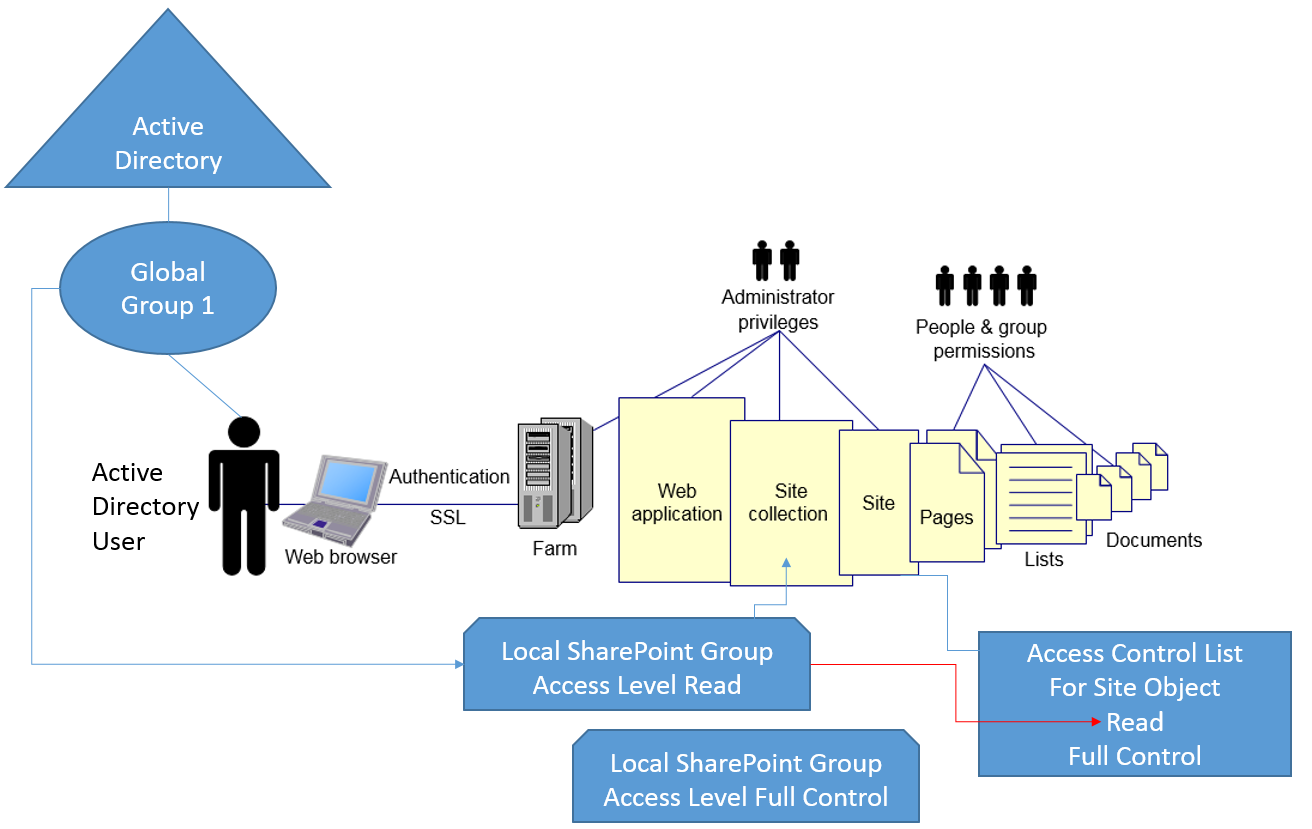
A content management strategy can add a layer of security to your digital library. Enabling the right number of privileges for each member in an organization ensures that they have just enough access, without compromising data or sensitive information stored on your site.