
We’ve somehow completed a whole quarter century, and what do we have to show for it?
Well apparently, a metric sh*t ton of content management systems. 🤯
With so many options to choose from (plus, the Mondays-in-January vibes we’ve all got right now 😩), how do you pick the right one for your business?
Not to worry — grab that well deserved cup of coffee and let’s break it down together. We’ve scoured the CMS market and rounded up the seven best content management systems in 2025 to help you find the perfect fit for your business.
Before we start though, let’s have a quick run through of what to look for in a CMS:
What makes for a great CMS?
We’re glad you asked! There are a few key features and characteristics you need to look for before investing in a new CMS.
- Easy to use
If every little change on your site calls for a developer, then you’ve been seriously missing out. Tools like a visual editor empower marketing to execute changes directly on the website and respond quicker to the content needs of your customers. Giving marketers the ability to visually move and place elements like text, images, and buttons without writing code can be a game-changer for your time-strapped team. - Scalable
Unless you’re the clairvoyant type 🔮, it’s impossible to know what changes your CMS will need to keep up with in the future. Plus, you’ll be dealing with ever-increasing volumes of traffic and customers (here’s hoping!) When you’ve invested vast swathes of time and money into your digital experience, you want to be sure that the CMS platform you use will be able to keep it fresh for years to come. An extensible, flexible CMS platform (plus a vendor who has their ducks in a row when it comes to updates and platform innovations) is key. - Secure
Your CMS needs to follow strong security practices, offer role-based access control, and, of course, comply with the standard data privacy regulations. - Integration-friendly
The best CMSs on the market today are API-first, enabling seamless integration with everything from your CRM and analytics tools to your ecommerce and marketing platforms. - Hits your budget sweet spot
Knowing your organization’s resources and determining how much you can allocate to your CMS will help you avoid overspending, while still opting for a solution that offers the essential features you need. Don’t forget to consider the hidden costs of a CMS, including training and implementation, either.
Now that you understand what to look for in a CMS, let’s examine seven of the most popular options.
The 7 best content management systems: Pros, cons and best uses
We’ll cover each CMS’s strengths, weaknesses, and the types of businesses they’re best suited for.
-
Optimizely
Yep, we agree it might be a tad cringey to sing the praises of our own CMS, but bear with us.
Because Optimizely’s hybrid headless CMS truly does gives you the best of both worlds — the user-friendliness of a traditional CMS and the omnichannel reach of a headless CMS. Whether you’re looking to create a personalized website, push dynamic content to mobile apps, or develop content for IoT devices, Optimizely’s CMS can give you the flexibility to reach your audience, wherever they are.
Unlike the purely headless CMS platforms further down our list, Optimizely’s hybrid model allows developers to use their preferred frontend framework, while content creators can enjoy a seamless, integrated content management system. And Optimizely doesn’t stop at simplifying content management and delivery (oh, no!) The CMS also comes loaded with powerful DXP features like personalization, experimentation, and ecommerce optimization (just for that little extra somethin’ somethin’).
One thing to bear in mind? Optimizely is primarily an enterprise CMS platform, so smaller businesses and start-ups will probably find the platform is a little spendy for their current needs.- Merges headless flexibility with the simplicity of traditional CMS
- Can service content across web, mobile, apps, and IoT devices
- Flexibility for both developers and content teams on the frontend and backend
- Built-in personalization and advanced testing capabilities
- AI-driven content recommendations and robust SEO tools
- Scalable, secure, and fully cloud-based infrastructure
- Streamlined workflow automation and collaboration features
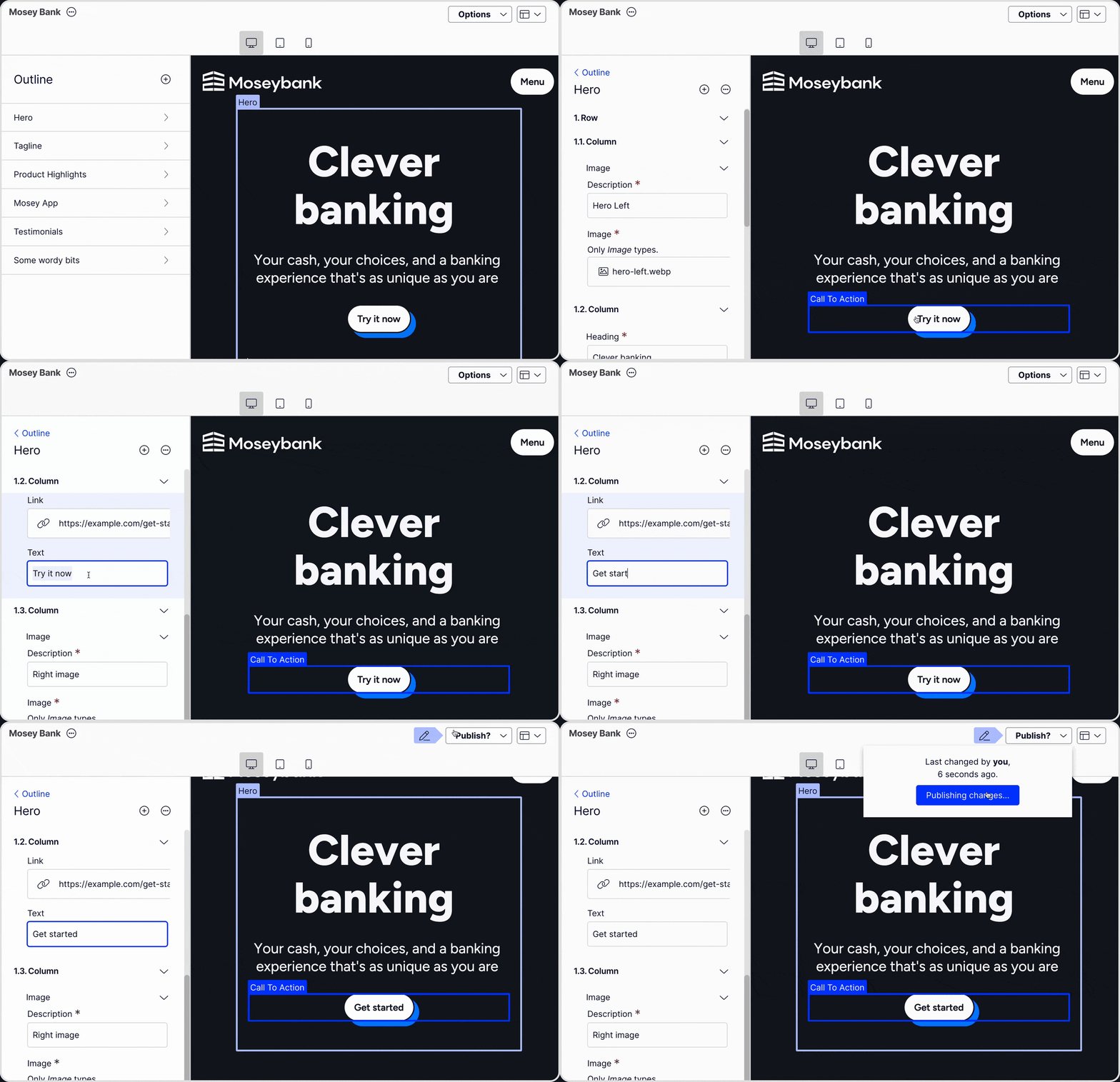
Image source: Optimizely -
WordPress
Everyone loves a bit of ye olde WordPress, and not just for the nostalgia factor. It’s super easy to use, comes with a frankly quite mind-boggling library of plug ins, and can handle pretty much anything you can throw at it, from a simple blog to an ecommerce site. The most popular CMS globally, offering flexibility, thousands of plugins, and easy-to-use interfaces.
It is worth noting, though, that WordPress tends to be less secure than other CMSs, especially if you’re not one to stay on top of plugin updates, or you use a lot of third-party add-ons (which kinda comes with the territory when using WordPress.) -
Acquia/Drupal
If you’re into the idea of a CMS you can customize to within an inch of its life, Acquia is well worth a look. It offers tons of flexibility to tailor everything to your needs, from content management to site structure. This is down to Acquia’s open-source approach, meaning you can build just about anything in their CMS. It’s great for large, complex websites, but be prepared to keep your dev team close, because all that extra customization capability comes with a whole heap of extra work for them. -
Contentful
One of the better-known headless CMS platforms on the market, Contentful is another solid option for large enterprises with complex content needs. As an API-first CMS, Contentful plays nicely with third-party tools and offers decent content modeling features.
But here’s the catch — marketers tend to find it a bit of a headache due to the platform’s steep learning curve, and even after implementation, you’ll need to lean heavily on technical expertise for even basic content updates. Plus, as your business grows, the costs can snowball fast, and even more rudimentary experimentation features, like A/B testing, aren’t included upfront. Great for dev teams, but your marketers might not be so much on board with this CMS.
Optimizely vs. Contentful 🤔 Which one is right for your team? -
Prismic
Prismic is all about super-smooth content scheduling and publishing, with its “Slice Machine” feature that makes it easy for marketers to whip up reusable sections of content without needing to bring the dev team into the fray. Prismic is super user-friendly, perfect for small to mid-sized teams with simpler content needs.
But if you’re a big enterprise website juggling tons of content across regions, Prismic might feel a bit restrictive — it lacks the deep customization larger orgs may crave, at least not without some heavy coding resources. -
Sanity
Thanks to its real-time collaboration tools and flexibility, developers and marketers alike are big fans of Sanity. While you can reuse content across channels relatively easily with Sanity (and we do love us a bit of omnichannel), that same flexibility can be a bit of a mare for markets who aren’t as used to a more technical setup. Implementing Sanity can also be quite the minefield for larger businesses who are looking for more of a plug-and-play CMS solution. -
Strapi
Strapi is an open-source, self-hosted headless CMS that’s essentially the playground of dreams for developers. But for marketers without technical backup at their disposal, using this CMS can feel like hitting their heads against a wall. It’s a solid choice for small to mid-sized businesses who need some heavy customization, though larger companies might miss more enterprise features like advanced security or collaboration tools. Strapi does get props from us for its wide array of plugin options and GraphQL support, which make it easier for devs to build custom features and integrate with other tools.
New year, new CMS
The right CMS can give you a critical edge when it comes to delivering stellar digital experiences and more website ROI. So don’t settle on a solution without doing some more hands-on research. To directly compare CMS options, we recommend the following:
- Schedule demos to get a breakdown of each platform’s capabilities
- Research reviews and customer feedback to see how real users feel about the CMS
- Create a shortlist of CMS options and conduct side-by-side comparisons
These steps will help you make a truly informed decision, and avoid investing in a CMS that falls short of what you need.

Hi there! I’m Kathy, and I’m thrilled to help businesses grow through the enchanting power of content. 🌟
- Last modified: 4/28/2025 2:51:29 PM